
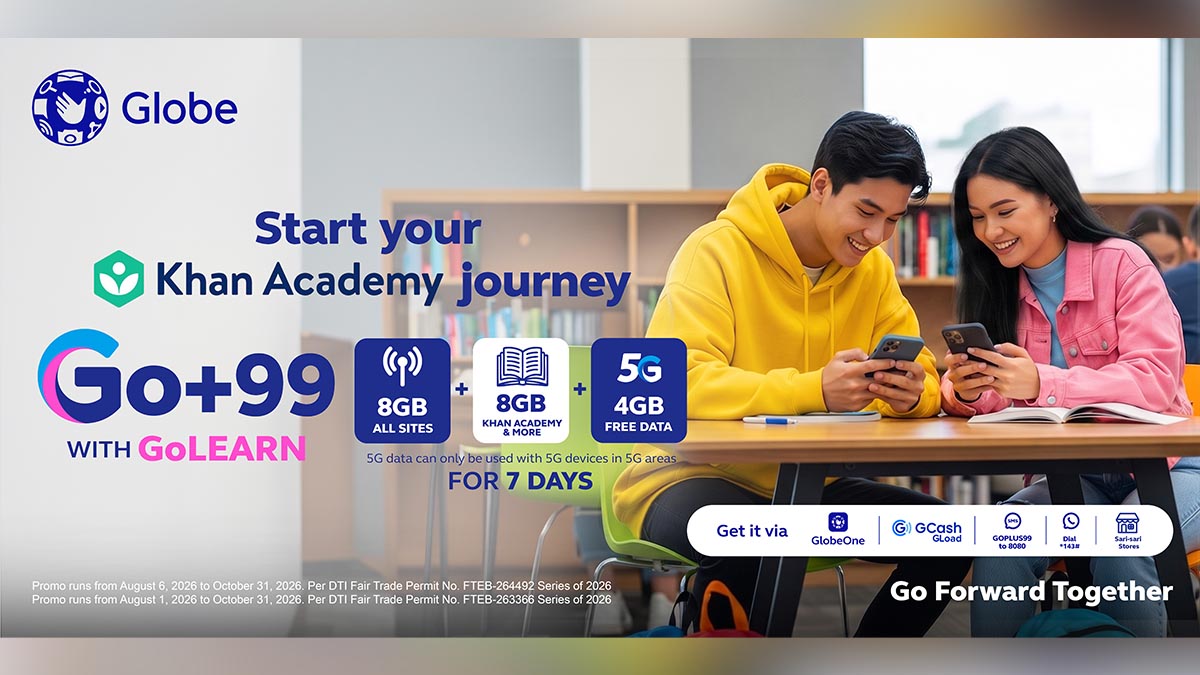
Globe is making digital learning resources more accessible to Filipino students, parents, and teachers through its partnership with Khan Academy Philippines this National Teachers’ Month.
The partnership gives students access to Khan Academy’s free lessons, interactive exercises, quizzes, and instructional videos across subjects including STEM and English. The resources can be accessed through the web or mobile app.
Globe customers can access Khan Academy through Go59, which includes 1GB of allocated data, or Go+99 with GoLEARN, which comes with 8GB of allocated data. Both options also provide access to Khanmigo, Khan Academy’s AI-powered learning assistant.
For teachers, Khan Academy can be used to assign lessons and mastery goals, monitor student progress, and identify areas where learners may need additional support. Khanmigo can also help with tasks such as lesson planning, creating rubrics and exit tickets, and preparing differentiated activities.
Parents can likewise use Khan Academy’s Parent Dashboard to monitor their child’s learning activity and identify subjects where they may need more help.
Globe is a partner of the National Teachers’ Month Coordinating Council, supporting efforts to help educators adapt to an increasingly digital learning environment.
Customers can subscribe to Go59 or Go+99 with GoLEARN through the GlobeOne app. Globe customers can also access Khan Academy for free by opening GlobeOne, tapping Help > Looking for Life Essentials > Khan Academy, and signing up or logging in.
How to access Khan Academy for Students:
- Open the GlobeOne app. Tap Help, then ‘Looking for Life Essentials?’
- Select Khan Academy under Education section. Tap Sign up or Log in.
- Choose Learner as your role. Choose your grade level and subjects.
- Start with one subject, such as Math, Science, or English.
- Watch a short lesson, answer practice questions, and keep practicing until you improve your mastery level.
How to access Khan Academy for Parents:
- Open the GlobeOne app. Tap Help, then ‘Looking for Life Essentials?’
- Select Khan Academy under Education section. Tap Sign up or Log in.
- Choose Parent as your role. Open your Parent Dashboard and click Add a child.
- Connect your child’s existing account or create a new child account. If your child is under 13, you can create a username and password for your child.
- Check your child’s activity, assignments, and progress reports regularly.
How to access Khan Academy for Teachers:
- Open the GlobeOne app. Tap Help, then ‘Looking for Life Essentials?’
- Select Khan Academy under Education section. Tap Sign up or Log in.
- Choose Teacher as your role. Create your class and add students.
- Assign videos, exercises, quizzes, or mastery goals. Use reports to see which students need support.
- Explore Khanmigo Teacher Tools for lesson planning, rubrics, exit tickets, differentiation, and standards-aligned lesson plans.
- Teachers in the Philippines can also use Khan for Educators (Philippines), which is an introductory course designed to help teachers integrate Khan Academy into classroom practice.